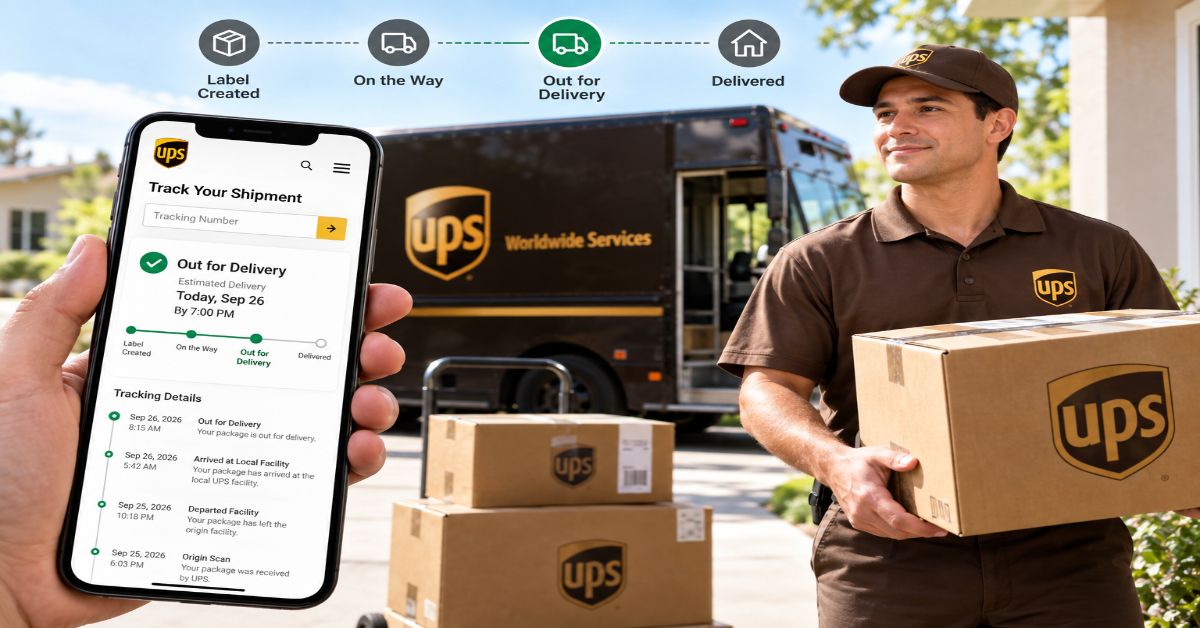
UPS Tracking is the carrier’s record of a shipment’s movement and delivery state. The fastest way to check it is to enter your tracking number on the official UPS tracking page. What makes the result useful is not simply seeing a city name; it is understanding the relationship between the latest scan, the scheduled delivery date, and any exception or delivery instruction.
I found that distinction especially important when comparing current tracking guides. Many explain the input box but stop at the obvious answer: paste the number and wait. A more useful guide treats tracking as a decision tool. A shipment can have no new scan for several hours and still be moving normally, while a package with a recent scan can still be delayed by an exception. UPS itself explains that long-distance shipments may not be scanned again until they reach the destination hub.
How do I track a UPS package?
To track a UPS package, find the carrier tracking number in the sender’s shipping confirmation, receipt, label, or UPS notice, then enter it directly on UPS.com. The official tracking page provides the current shipment information and delivery details available to UPS.
- Find the tracking identifier. Do not substitute the retailer’s order number unless the seller specifically says it is also a carrier reference.
- Open the official UPS tracking page rather than a link from an unexpected text or email.
- Enter the tracking number exactly as provided. If you are tracking several shipments, UPS documentation supports multiple tracking numbers in its tracking workflow.
- Read the latest scan, shipment progress, status, and scheduled delivery information together.
- If the status shows an exception, open the detailed shipment information and follow the stated next step before assuming the parcel is lost.
For the actual lookup, use the official UPS tracking page rather than an unofficial page when you need the carrier’s authoritative status.
What does a UPS tracking number look like?
The familiar UPS small-package identifier starts with 1Z and is 18 characters long in the common format. UPS’s current support documentation also lists other formats, including 12-digit numbers, T-prefixed identifiers, and 9-digit identifiers. That means a number that does not start with 1Z is not automatically fake.
| Identifier pattern | What it tells you | Practical note |
| 1Z + 16 characters | Common UPS parcel format | The format most consumers encounter. |
| 12 digits | UPS-supported tracking format | Do not reject it simply because it lacks 1Z. |
| T + 10 digits | UPS-supported format | Can appear on certain shipment types. |
| 9 digits | UPS-supported format | Often associated with other UPS shipment categories. |
A useful safeguard is to treat the format as an identifier clue, not proof of shipment movement. A valid-looking number can still represent a label that has not entered the UPS network, and an order number can look just as plausible to a person who has not checked the carrier.
What do the main UPS tracking statuses mean?
The status vocabulary is where tracking becomes genuinely useful. UPS’s own support material defines several common states as follows.
| Status | Meaning | What I would do next |
| Label Created | UPS has received shipment details and billing information from the sender; UPS says the status changes after it has possession and the shipment is moving. | If it remains unchanged, check with the sender before assuming UPS has the parcel. |
| Shipped / On the Way | UPS has received the shipment and it is moving through the network with a scheduled delivery date. | Use the delivery date and latest scan as the main signals. |
| Out for Delivery | The local UPS facility has received the package and dispatched it for final delivery. | Keep an eye on delivery instructions and remain available if a signature or access requirement applies. |
| Delivered | UPS records the shipment as delivered and records a delivery time. | Check the stated delivery location and nearby safe places if you cannot find it. |
| Delivered to a UPS Access Point | A selected pickup location has received the shipment. | Confirm the pickup status and location before traveling. |
| Exception | An unexpected event may change the scheduled delivery date; the reason should appear in shipment progress. | Read the exception detail first, then follow the updated instruction. |
Why can UPS tracking stop updating?
A quiet tracking history is not automatically a lost package. UPS notes that shipments traveling long distances may not receive another scan until they reach their destination hub. That matters because tracking is event-based: the page can show a shipment as moving even when the visible scan history has not changed for a while.
The better diagnostic is to compare three signals: the latest scan, the scheduled delivery date, and any exception message. If the delivery date is still intact and there is no exception, a short period without a new scan may simply be a gap between network events. If the scheduled date has passed, the status changes to an exception, or the package is reported damaged or missing, the situation is different.
This is one of the clearest places where the generic “real-time tracking” language used by third-party pages can mislead. Tracking does not mean a continuous GPS feed for every package. UPS describes tracking as information captured through scans and, increasingly, sensors in parts of its network.
How should I read “Out for Delivery”?
“Out for Delivery” means the local UPS facility has received the package and dispatched it to a driver for final delivery. It is stronger evidence of imminent delivery than an ordinary “On the Way” scan, but it is not a guarantee that the parcel will arrive at a particular minute.
UPS says Ground packages are generally delivered Monday through Friday between 9 a.m. and 9 p.m. at residences, sometimes later, while commercial deliveries generally follow business hours. Express services can have guaranteed delivery times depending on the service. That distinction is important: a consumer should not interpret every UPS tracking page as promising the same delivery window.
What does a UPS exception mean?
An exception means something unexpected happened in the shipment process that may change the scheduled delivery date. The word itself is less useful than the reason attached to it. UPS says the reason is shown in the Shipment Progress section and that the tracking page will show a new date when the delivery date changes.
- Read the detailed exception instead of relying on the headline status alone.
- Check whether UPS has supplied a revised delivery date.
- If customs or import processing is involved, review the shipment’s customs instructions and any outstanding duties or documentation.
- If the shipment is materially overdue, contact the seller as well as UPS because the seller may need to initiate the carrier claim or investigation.
UPS tracking versus UPS My Choice
Basic tracking answers “Where is my package?” UPS My Choice adds delivery-management features for eligible shipments and regions. Current UPS material describes alerts, estimated delivery information, shipment visibility, and options such as changing or rerouting eligible deliveries.
| Feature | Standard tracking | UPS My Choice |
| Check shipment status | Yes | Yes |
| See delivery updates | Yes | Yes, with additional notification options |
| Manage eligible delivery | Limited | More delivery-management controls |
| Multiple inbound/outbound shipments in one dashboard | Not the core experience | Available in supported My Choice experiences |
| Availability | Broad | Varies by country, shipment and eligibility |
The important distinction is that My Choice does not make every package fully controllable. Shipment restrictions, service type, sender instructions, country, and eligibility can limit what changes are available.
What if UPS says delivered but I cannot find the package?
Start with the delivery details instead of immediately assuming theft or a carrier error. UPS advises checking exterior doors and other safe locations, and asking household members or neighbors who may have accepted the package. If the shipment still cannot be located, UPS says the seller should be contacted to start a claim.
- Check the delivery timestamp and stated location.
- Check porch, side door, garage, reception desk, mailroom, or other expected safe locations.
- Ask household members, building staff, or nearby neighbors.
- Review any delivery photo or confirmation available for the shipment.
- Contact the seller promptly if the parcel remains missing and follow UPS claim guidance.
How do I avoid fake UPS tracking messages?
Tracking scams work because package problems create urgency. The FTC reported that consumers lost $470 million to scams that started with text messages in 2024, and fake package-delivery problems were the most commonly reported type of text scam in that dataset.
The safest workflow is to separate the message from the shipment. If a text or email says there is a problem, do not use its link to investigate. Open UPS directly or check the retailer account where the order originated. The FTC specifically advises consumers to verify delivery information independently rather than providing information through a suspicious message.
- Unexpected message + urgent delivery problem: pause.
- Link asks for card details, passwords, or a small redelivery fee: do not enter them.
- Open UPS by typing the known website address or using a saved official bookmark.
- Compare the tracking number with the order you actually placed.
- If the message is fraudulent, report it through the appropriate spam or fraud-reporting channel.
The hidden limitation of tracking: a scan is not the same as certainty
One of the most useful distinctions I found in the competitive research is between evidence of movement and evidence of outcome. A scan proves that UPS recorded an event. It does not, by itself, guarantee that the parcel will arrive on the original date, that customs will clear immediately, or that a delivered package is physically in your hands.
That gives readers a better mental model: use tracking as a sequence of operational signals. The last scan tells you what UPS most recently recorded. The scheduled date tells you the current delivery expectation. The exception field tells you whether the expectation has been disrupted. Delivery confirmation tells you UPS considers the delivery complete, but a missing parcel still requires investigation.
UPS tracking for international shipments
International tracking can look less continuous because a shipment may pass through customs, different facilities, and partner or postal networks. UPS support explicitly provides guidance for customs and import fees, and tracking may show a shipment waiting for clearance or documentation.
For cross-border packages, I would avoid interpreting every gap as a problem. Instead, check whether the tracking record identifies customs activity, a revised delivery date, or an action required from the receiver. The practical question is not “Why did the map stop?” but “Has UPS identified a new obligation, exception, or delivery date?”
What the current top 10 UPS tracking articles commonly miss
I reviewed a current competitive sample of prominent pages surfaced for “UPS tracking” and close variants, including PackageTrackNow, TrackParcelHub, ParcelsZen, Your Package Tracker, TrackingAdvice, ShipSmarter, Aussie Pulse, LegalClarity, PostRadar, and Eride Corner. Search results vary by location, device, personalization, and date, so I treated these as a benchmark sample rather than a permanent universal ranking.
The recurring strengths were easy definitions, 1Z-format explanations, tracking steps, status lists, and troubleshooting. The recurring weakness was treating the last scan like continuous GPS data or mixing UPS-documented facts with third-party inference.
My approach is deliberately different: the article connects the status vocabulary to an action framework, separates carrier evidence from prediction, explains scam verification, and treats the scheduled delivery date as a separate signal from the scan history. That creates information gain without simply making the page longer.
Three practical insights worth keeping
- Do not judge a package by scan age alone. Judge the combination of last scan, delivery date, and exception status.
- A valid tracking format does not prove physical possession. “Label Created” can exist before UPS has the package in its network.
- A tracking message is not evidence that the message itself is authentic. Verify the shipment independently on UPS.com.
Where tracking fits into online buying and selling
Shipping is only one part of a transaction. If you are buying through a marketplace, the seller profile, payment path, return rules, and delivery evidence all matter. Our Facebook Marketplace guide explains why local pickup, shipped orders, and partner checkout should not be treated as the same transaction.
For local classifieds, our Craigslist guide covers the different trust model that applies when the platform is mainly a discovery and messaging layer.
If the shipment contains a product you are evaluating, our product reviews guide explains why product identity, evidence, and limitations matter more than a simple star score.
The Future of UPS Tracking in 2027
The clearest direction into 2027 is richer shipment visibility rather than a simple replacement of tracking pages. UPS is already combining conventional scans with RFID-enabled sensors in parts of its network, and its current support material presents that as a way to add more tracking detail. The likely practical effect is more granular operational data where the infrastructure supports it.
UPS My Choice already connects shipment visibility with alerts and eligible delivery changes. That suggests the distinction between “track” and “manage” will continue to narrow, although shipment restrictions and regional availability will remain.
What is less certain is universal real-time visibility. Physical networks still contain handoffs, customs processes, service restrictions, and events that cannot be represented as continuous location data. I therefore would not treat “real-time” as a promise that every shipment will behave like a GPS-tracked vehicle.
Takeaways
- Use the official UPS tracking page when you need authoritative shipment information.
- Read the scan history and scheduled delivery date together.
- Treat “Label Created” differently from proof that UPS physically has the parcel.
- An exception is a reason to read the detailed shipment progress, not an automatic declaration that the package is lost.
- UPS My Choice can add alerts and delivery-management options, but eligibility varies.
- For delivered-but-missing packages, check likely safe locations and contact the seller promptly.
- Never use an unexpected delivery text as the source of truth; verify the shipment independently.
Conclusion
UPS tracking becomes much easier once you stop treating it as a single status box. The useful picture comes from three pieces of evidence: the latest scan, the current delivery expectation, and any exception or action message attached to the shipment.
For a normal package, the workflow is straightforward: locate the tracking number, check it directly on UPS.com, read the shipment progress, and use the scheduled date as the main delivery reference. If the status changes to an exception, follow the specific explanation. If a package is marked delivered but cannot be found, investigate the delivery location and contact the seller rather than relying on assumptions.
In other words, good tracking is not about refreshing more often. It is about interpreting better evidence.
Structured FAQ
How can I track a UPS package by tracking number?
Open the official UPS tracking page and enter the tracking number exactly as provided by the sender. UPS supports several tracking-number formats, so a number that does not begin with 1Z is not automatically invalid.
What does UPS tracking mean by “Label Created”?
UPS says this status means shipment details and billing information have been received from the sender. It does not necessarily mean UPS has physically received and moved the package yet.
Why is my UPS tracking not updating?
A gap in scans does not automatically mean the shipment is lost. UPS notes that long-distance shipments may not be scanned again until they reach a destination hub. Check the delivery date and any exception message before escalating.
What does “Out for Delivery” mean on UPS tracking?
It means the local UPS facility has received the package and dispatched it to a driver for final delivery. The exact delivery time depends on the service and destination.
Can I track a UPS package without the 1Z format?
Yes. UPS’s support documentation lists multiple supported tracking-number formats, including 12-digit, T-prefixed, and 9-digit identifiers.
What should I do if UPS says my package was delivered but I cannot find it?
Check likely safe locations, household members, neighbors, reception or mailroom areas, and any available delivery photo or confirmation. If the parcel remains missing, contact the seller and follow UPS claim guidance.
Are UPS tracking text messages always real?
No. Package-delivery impersonation scams are common. If a message is unexpected or asks you to click a link or provide payment information, verify the shipment independently through the retailer or official UPS website.
Methodology
Competitive review
I researched this article on September 26, 2026. The competitive benchmark used ten prominent current pages surfaced for “UPS tracking” and close variants: PackageTrackNow, TrackParcelHub, ParcelsZen, Your Package Tracker, TrackingAdvice, ShipSmarter, Aussie Pulse, LegalClarity, PostRadar, and Eride Corner. Search rankings vary by location, device, personalization, and time, so this is a dated sample rather than a permanent universal top ten.
Source validation and limitations
Primary validation came from current UPS tracking and support pages, including UPS’s explanations of tracking statuses, tracking-number formats, delivery notices, delivery timing, and UPS My Choice. Fraud context came from the U.S. Federal Trade Commission, including its 2025 data on text scams. I used current third-party tracking guides only to identify recurring SERP patterns and information gaps, not as the authority for UPS policy.
I also audited rubblemagazine.org for live internal pages. Three pages fit naturally enough to use without forcing a link: the Facebook Marketplace guide, the Craigslist guide, and the product reviews guide. I did not insert unrelated pages simply to reach a numerical internal-link target; the internal-link set should expand as the site publishes more shipping, ecommerce, marketplace, and consumer-help content.
I did not ship or receive a live UPS parcel for this article, so I do not present invented first-hand testing results. First-person wording describes the research and analytical process rather than a fabricated delivery experience. Tracking behavior can vary by service, country, shipment restrictions, and network conditions. AI assistance was used for research organization, drafting, and document production. A human editor must verify every statistic, named claim, reference, live hyperlink, and first-person statement before publication.
References
- Federal Trade Commission. (2025, April). New FTC data show top text message scams of 2024; overall losses to text scams hit $470 million. https://www.ftc.gov/news-events/news/press-releases/2025/04/new-ftc-data-show-top-text-scams-2024-overall-losses-text-scams-hit-470-million
- Federal Trade Commission. (2025, April). Think that text message is from USPS? It could be a scam. https://consumer.ftc.gov/consumer-alerts/2025/04/think-text-message-usps-it-could-be-scam
- United Parcel Service. (2026). Tracking support. https://www.ups.com/us/en/support/tracking-support
- United Parcel Service. (2026). What does my UPS tracking status mean? https://es-us-apps.ups.com/us/en/support/tracking-support/where-is-my-package/understanding-tracking-status
- United Parcel Service. (2026). UPS delivery notice. https://www.ups.com/us/en/support/tracking-support/where-is-my-package/how-to-use-infonotice
- United Parcel Service. (2026). UPS My Choice. https://www.ups.com/in/en/track/ups-my-choice