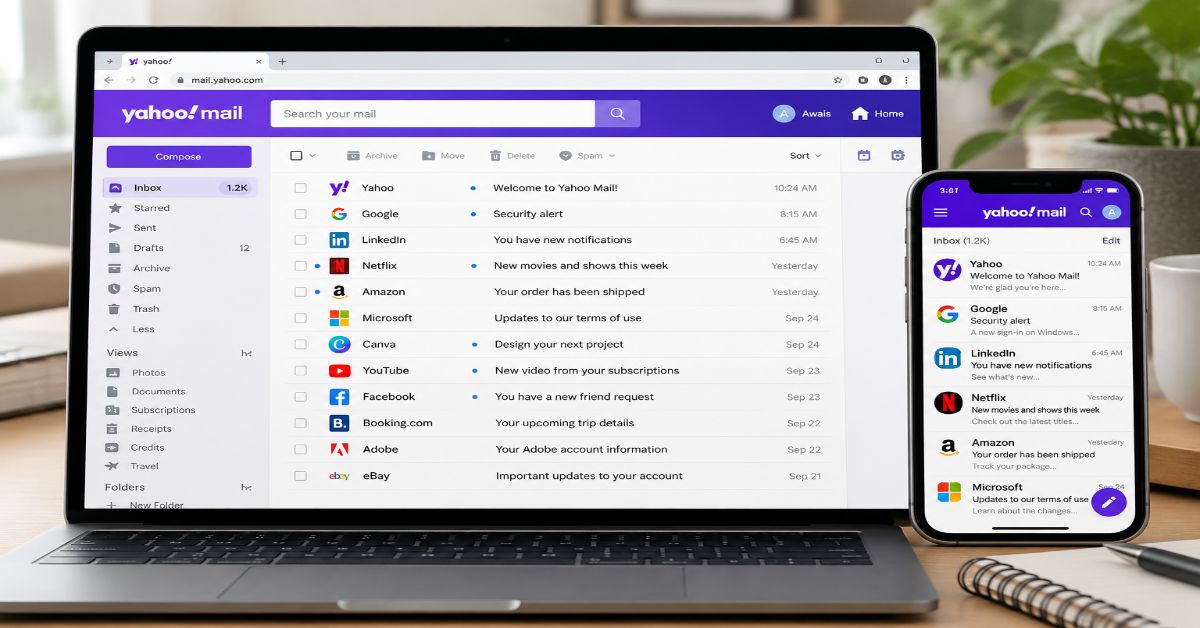
Yahoo Mail is still a free email service, but the version described in many older reviews is not the version I would describe in 2026. Yahoo has moved the product toward a more organized, AI-assisted inbox, while its storage policy has changed: standard free storage is now 15 GB.
That matters because “yahoo mail” is a broad search. Some readers want the sign-in page; others want to create an address, compare Yahoo with Gmail or Outlook, clean up an old inbox, recover an account or understand the security controls. A useful guide has to answer those jobs rather than simply list features.
The short answer is that Yahoo Mail remains a capable consumer email service with strong organization and cleanup tools, especially if you use search, filters, unsubscribe controls and its newer AI features. The main practical limitation is understanding the current storage model and recognizing that some features vary by region or plan.
I reviewed current Yahoo documentation and a competitive sample of prominent search results before writing this guide. The clearest gap is freshness: third-party pages still repeat older product details while Yahoo’s current documentation describes a substantially different inbox experience.
What Is Yahoo Mail in 2026?
Yahoo Mail is Yahoo’s consumer email service for sending, receiving, organizing and searching messages through the web and mobile apps. It is free to sign up for, with optional paid plans and storage upgrades. Yahoo’s current Yahoo Mail overview positions the service around inbox organization, AI assistance, security, cleanup and the ability to connect other email accounts.
The current interface is built around more than a traditional chronological inbox. Yahoo describes a Primary inbox plus dedicated views for offers, newsletters and social messages. It also provides a starred-message panel, attachment gallery, advanced search filters and easy unsubscribe controls.
One of the more important changes is the addition of AI-assisted functions. Yahoo says its newer experience can summarize messages, help compose replies and surface quick actions. On supported mobile versions, those tools can turn details inside a message into actions such as adding an event or reminder.
Is Yahoo Mail Free?
Yes. Yahoo says its email service is free to sign up for and use. Optional paid plans add features such as an ad-free inbox and additional storage, but the exact plans available can vary by locale.
The important distinction is between the free service and paid storage. Yahoo’s current storage documentation says standard Yahoo Mail provides 15 GB of free storage. It also describes paid storage options, including 100 GB and 1 TB plans, while Yahoo Mail Plus can add 200 GB and premium features where those plans are available.
This is a major freshness point. Older reviews commonly describe the free service as having 1 TB of storage. That was a widely repeated feature of Yahoo Mail, but it should not be presented as the current standard free allocation. If you are comparing email services today, check the live Yahoo storage page rather than relying on an older review.
The current storage structure is easiest to understand as a tiered model:
| Storage detail | Current position | Why it matters |
| Standard free storage | 15 GB | Enough for ordinary email use, but large archives can consume it |
| Paid storage | Options include 100 GB and 1 TB | Useful for long-running or attachment-heavy accounts |
| Yahoo Mail Plus | 200 GB plus premium features in supported plans | Adds ad-free and other premium controls |
| Availability | Plans vary by locale | Your account may show different options |
For heavy users, storage is not just a number. Large attachments, years of newsletters and photo-heavy messages can consume space without producing much value. I would periodically search for large messages and delete what no longer matters rather than waiting until the account is close to its limit.
What Are the Main Yahoo Mail Features?
How does Yahoo Mail organize an inbox?
Yahoo’s current experience uses a Primary inbox plus dedicated views for offers, newsletters and social messages. Starred messages can also be surfaced separately. The goal is to reduce the need to treat every incoming email as equally important.
Yahoo also supports filters. Its documentation says users can create up to 500 filters that automatically sort new messages into folders or Trash. Filters are applied in order, so rule placement matters when more than one rule matches.
How good is Yahoo Mail search?
Search can use sender, recipient, subject, keyword and date, with additional filters for folders, attachments, photos and calendar invites. On mobile, Yahoo also offers category filters for areas such as purchases, travel, finance and shopping, depending on the app and platform.
For a large inbox, this is more useful than building dozens of folders. If you remember who sent a message, roughly when it arrived, or that it contained an attachment, search can usually narrow the field quickly.
What AI features does Yahoo Mail have?
Yahoo currently describes AI Compose and AI-powered summaries. AI Compose helps draft or adjust an email, while summaries extract important details from longer messages. Supported versions also offer quick actions that can turn information in a message into tasks, reminders or calendar-related actions.
I would treat a summary as a shortcut, not a replacement for the original message when money, dates, travel, account recovery or other consequential details are involved.
Can Yahoo Mail combine other email accounts?
Yes. Yahoo says users can connect Gmail, Outlook, AOL and other accounts so multiple mailboxes can be viewed together. The convenience is substantial, but the security responsibility is too: keep each underlying account protected with unique credentials and current recovery methods.
How Much Can You Send as an Attachment?
Yahoo currently limits the total size of attachments in a single incoming or outgoing message to 25 MB. The limit applies to the combined attachment size, not 25 MB per individual file.
That sounds generous until you try to send several high-resolution images, a video or a large PDF collection. The practical workaround is simple: upload the larger material to a trusted cloud service and send a sharing link.
A practical attachment workflow looks like this:
| Task | Yahoo Mail approach | Practical limit or note |
| Normal document | Attach directly | Fine if total attachments stay below 25 MB |
| Several photos | Attach or compress | Watch the combined size |
| Large video | Use a cloud link | Avoid forcing the file into email |
| Large archive | Cloud storage link | Easier for recipients and less likely to fail |
Yahoo also blocks or restricts a range of executable and script-like file types because they can be used to distribute malware. That is a useful reminder that attachment handling is part of email security, not just convenience.
Is Yahoo Mail Secure?
Yahoo provides two-step verification, recovery controls, account-activity checks and other security features, but no email provider can make a user immune to phishing or account takeover. Yahoo advises users to keep recovery information current, use strong passwords and avoid suspicious links.
On mobile, Yahoo says its app uses BIMI indicators to help verify businesses and senders and can alert users when a message appears spoofed.
I would enable two-step verification where available, keep recovery information current, avoid password reuse and open the real service independently when an unexpected message asks for credentials.
For broader guidance on judging unfamiliar digital services and domain identity, Rubble Magazine’s SoSoActive domain-safety guide is useful context. The same principle applies to email: a familiar brand name is not proof that every link carrying that name is legitimate.
What should you do if a Yahoo Mail message looks suspicious?
Check the sender address, link destination and request context before clicking. If a message asks for a password, payment or verification code, navigate to the service independently.
If you submit a password to a phishing page, change it immediately and anywhere else it was reused. If financial information was exposed, contact the institution through its official channel.
What Are the Biggest Weaknesses?
The main trade-offs are storage, regional availability, AI verification and advertising.
First, the standard free allowance is now 15 GB, so people with very large archives need to monitor usage. Second, Yahoo says some features are not available in every locale, so menus can differ between users.
Third, AI features create a verification obligation. Email contains dates, names, addresses, payment amounts and account instructions that should be checked against the original message. Finally, the free experience includes advertising, while Yahoo Mail Plus is positioned as an ad-free option.
For a structured approach to judging software and services, Rubble Magazine’s Product Reviews guide explains why method, update date and evidence matter more than a polished feature list.
Yahoo Mail vs Gmail vs Outlook
A comparison is useful, but no provider is universally best. Each is tied to a different ecosystem.
| Area | Yahoo Mail | Gmail | Outlook | Reader takeaway |
| Free email | Yes | Yes | Yes | All three have free consumer options |
| Current free storage | 15 GB | 15 GB shared with Google services | 15 GB mailbox storage | Check current plan pages |
| AI assistance | AI Compose and summaries | Google AI features | Microsoft AI/Copilot ecosystem | Feature sets change quickly |
| Organization | Primary, category views, filters | Labels, filters and categories | Folders, Focused Inbox and rules | Choose the workflow you prefer |
| Ecosystem | Yahoo services | Google services | Microsoft 365 | Existing apps can matter more than inbox features |
Gmail makes particular sense for people deeply invested in Google services; Outlook fits naturally into Microsoft-heavy workflows. Yahoo Mail can suit users who value its organization, connected mailboxes, cleanup tools and optional larger storage tiers.
The comparison should be dated because storage, AI features and plan structures change.
How Can You Organize Yahoo Mail Better?
- Create folders around recurring work such as bills, travel, purchases or important accounts.
- Use filters for repetitive messages. Yahoo supports up to 500, but most people need far fewer.
- Search before manually browsing. Sender, subject, date and attachment filters can replace complicated filing.
- Unsubscribe from low-value lists when the one-tap option appears instead of deleting the same messages repeatedly.
- Review large messages and attachments so the 15 GB free allowance does not fill unexpectedly.
- Keep security separate from convenience. Do not reuse your Yahoo password because email accounts are often used to reset other services.
If you are also improving your wider digital workflow, Rubble Magazine’s Personal Development guide takes a similar systems approach: reduce repeated decisions and build small routines rather than relying on constant manual effort.
What Is the Future of Yahoo Mail in 2027?
Yahoo’s current direction suggests continued emphasis on reducing inbox friction through AI summaries, AI Compose, quick actions, planning tools and unified account management.
The interesting issue is transparency. As more automation prioritizes, summarizes or converts messages into actions, users need to understand why something was surfaced and should retain access to the original evidence.
Storage is another area to watch. Yahoo has already moved standard free storage to 15 GB while offering larger paid tiers. Security is likely to remain central as well, with phishing, spoofing and malicious attachments continuing to make sender identity and link verification important.
Key Takeaways
- Yahoo Mail remains a free, full-featured consumer email service in 2026, with paid storage and premium options.
- The current standard free storage is 15 GB, so older 1 TB claims should be treated as historical rather than current.
- AI summaries and AI Compose are meaningful additions, but important details should still be checked against the original message.
- Advanced search and up to 500 filters can make a large inbox manageable without complicated manual filing.
- The 25 MB attachment limit makes cloud links the better choice for large files.
- Two-step verification, unique credentials and current recovery details are more important than any single inbox feature.
- Yahoo Mail is best evaluated against your workflow and ecosystem, not through a universal “best email” label.
Conclusion
Yahoo Mail is not simply the same legacy inbox with a new logo. Its current product has moved toward AI-assisted reading and writing, stronger inbox organization, account aggregation and faster cleanup, while its storage model has changed substantially from the 1 TB free allowance repeated in many older reviews.
For an everyday user, the service can cover the basics and much more: sending messages, handling attachments, finding old conversations, filtering recurring mail, unsubscribing from lists, managing multiple accounts and adding another layer of sign-in security. The most important limitation is that features and plans can vary by region, and the current 15 GB standard storage means long-term archives need more attention.
I would judge the service by how well those tools fit the way you actually communicate. If you want a familiar consumer mailbox with modern organization and AI assistance, Yahoo’s current feature set is materially broader than many outdated reviews suggest. If you need deep integration with Google or Microsoft productivity suites, the ecosystem around another provider may matter more than the inbox itself.
The useful takeaway is simple: evaluate the current product, not the version described by an old comparison page.
Frequently Asked Questions
Is Yahoo Mail still free in 2026?
Yes. Yahoo says Yahoo Mail is free to sign up for and use. Paid storage and Yahoo Mail Plus options are available in supported locales for users who need additional capacity or premium features.
How much free storage does Yahoo Mail give you?
Yahoo’s current storage documentation says standard Yahoo Mail provides 15 GB of free storage. Additional storage plans are available, with availability varying by locale.
Is Yahoo Mail better than Gmail?
There is no universal answer. Yahoo Mail emphasizes inbox organization, AI summaries, AI Compose, cleanup tools and connected mailboxes. Gmail is tightly integrated with Google services. The better fit depends on the workflow and ecosystem you already use.
Does Yahoo Mail have AI?
Yes. Yahoo currently describes AI Compose and AI-powered message summaries, with some additional AI-assisted actions available in supported versions of the service and app.
What is the Yahoo Mail attachment limit?
The combined size of attachments in one incoming or outgoing message cannot exceed 25 MB. Larger files should generally be shared through a cloud-storage link.
Can I use Gmail inside Yahoo Mail?
Yes. Yahoo says you can connect Gmail and other providers so you can manage multiple mailboxes from the Yahoo Mail interface.
How do I make Yahoo Mail more secure?
Use two-step verification where available, maintain current recovery information, use a unique password, review account activity and avoid entering credentials through unexpected email links. Treat suspicious messages as potentially unsafe until independently verified.
Methodology
I researched the keyword on September 26, 2026 and treated the search landscape as a competitive sample rather than a permanent Google ranking because results vary by country, device, personalization and time. I reviewed ten prominent result types/pages covering Yahoo’s official documentation, TechRadar, IONOS, Capterra, G2, Software Advice, Productivity Apps, Cleanbox, Hulela and Yahoo-hosted TechRadar material.
The main gap was freshness: older third-party pages still emphasize Yahoo’s former 1 TB free-storage model, while current Yahoo documentation describes 15 GB standard free storage plus separate paid options. I therefore used first-party Yahoo documentation for storage, attachments, security, filters, mobile features and AI functionality.
I did not create a new Yahoo account, send test emails or perform a security audit. First-person language therefore describes editorial analysis rather than fabricated hands-on testing. Feature availability can vary by region, account type and product version. AI assistance was used for research, drafting and document production. A human editor must verify statistics, links, references and first-person statements before publication.
References
Capterra. (2026, September 16). Yahoo Mail reviews. Capterra.
Cleanbox. (2026, September 8). Gmail vs Outlook vs Yahoo: Which free email is most private?
Google. (2026). Overview of differences between Gmail and Outlook. Google Help.
Hulela. (2026, January 12). Understanding email platforms: Gmail vs Outlook vs Yahoo.
IONOS. (2026, August 17). Which are the best free email providers?
Productivity Apps. (2026). Compare Gmail, Outlook, and Yahoo Mail.
Software Advice. (2026). Microsoft Outlook vs Yahoo Mail.
TechRadar. (2024, April 2). Yahoo Mail review. TechRadar.
Yahoo. (2026). Overview of New Yahoo Mail. Yahoo Help.
Yahoo. (2026). Overview of Yahoo Mail storage. Yahoo Help.
Yahoo. (2026). Message size limits in Yahoo Mail. Yahoo Help.
Yahoo. (2026). Secure your Yahoo account. Yahoo Help.
Yahoo. (2026). Add two-step verification for extra security. Yahoo Help.
Yahoo. (2026). Use filters to organize in New Yahoo Mail. Yahoo Help.
Yahoo. (2026). Search for messages in Yahoo Mail. Yahoo Help.
Yahoo. (2026). Overview of Yahoo Mail for Android. Yahoo Help.
Yahoo. (2026). Use AI features in the Yahoo Mail app for iOS. Yahoo Help.